5 alternatives · Checked

21st.dev alternatives for design-to-build workflows

Choose UIDiscovery when you need real website and app references plus original build briefs before you pick components; stay on 21st.dev when you want a multi-author registry of installable React components. The best 21st.dev alternatives are shadcn/ui for free editable primitives, Magic UI for animated marketing components, Aceternity UI for premium effects, v0 for prompt-to-app generation, and UIDiscovery for visual references and build briefs. Choose by the job: editable React code, a hosted AI builder, or references that define the brief before you pick components. This comparison separates those jobs and links to one original prompt output you can inspect and test.

Written by the UI Discovery team — we make one of the tools on this list. Competitor details come from their own websites; see sources.

Isometric illustration of matte interface blocks snapping together on a grid

The short answer

Our verdict

For primitives and composable blocks, compare shadcn/ui. For marketing effects, compare Magic UI and Aceternity UI; check motion, dependencies and licensing. v0 is a hosted generator, not a fixed component catalogue. UI Discovery supplies visual research and original briefs, not a replacement registry. You can keep using 21st.dev for implementation.

First, the incumbent

What 21st.dev does well

21st.dev is a multi-author React registry with templates and shadcn themes. Its homepage advertises 12,000+ items, free browsing and two free component copies per day. It offers prompt handoff or shadcn CLI installation. The annual pricing view lists Builder at $6/month, Builder + AI from $15/month and Team at $7.50/seat/month; these are yearly-billed equivalents. Author-sold templates are purchased separately.

Where 21st.dev is still the better choice

  • Many authors and styles in one catalogue, including collections from some alternatives listed here.
  • Editable implementation source rather than screenshot-only inspiration.
  • Paid plans advertise component-code retrieval over MCP; AI generation adds credit limits. These capabilities were not account-tested here.

Reasons people look elsewhere

  • You want to assemble a consistent interface from primitives rather than combine unrelated styles.
  • You prefer free components or a one-time bundle, and its license fits your project.
  • You need to decide what the page should look like before choosing components — that's a reference problem, not a component problem.

Side by side

21st.dev alternatives compared

Public sources checked October 7, 2026, not paid-account tests. Annual monthly equivalents are not monthly billing. Aceternity lists sale prices; v0's free credit offer varies by account, and its Premium plan is closed to new users. Verify checkout, license and usage limits before buying.

shadcn/ui

Price
Free and open source
Free plan
Yes — the project's open-source code; third-party registry terms vary
Library
Primitives, blocks and charts; an open registry format
Platforms
React setups including Next.js, Vite, React Router, Astro and TanStack Start; not a promise of native Vue/Svelte components
AI features
Open code, agent skills and an MCP server for compatible registries
Export & handoff
Source added to your project through the CLI; review dependencies and updates

Magic UI

Price
Free components · Pro $199 one-time
Free plan
Yes — 150+ components
Library
150+ free animated components and effects; Pro advertises 50+ sections and 9+ templates
Platforms
React, TypeScript, Tailwind CSS, Motion
AI features
Official MCP server for component access from AI-assisted editors; not a hosted app generator
Export & handoff
Copy source or install into your repo

Aceternity UI

Price
Free components · All-Access $169/yr or $199 one-time (sale prices when checked)
Free plan
Yes — all free components
Library
Free components; All-Access adds 200+ premium blocks and 12+ templates
Platforms
Next.js, React, Tailwind CSS, Framer Motion
AI features
AI-ready prompts for Lovable, v0 and more (paid)
Export & handoff
Copy and paste into your project

v0

Price
Free offer varies · Plus $30/user/month · Business $100/user/month; Premium is closed to new users
Free plan
Yes — docs list 7 messages/day; new-user $5 one-time offer versus existing Free users' $5/month
Library
Generates UI rather than offering a fixed library
Platforms
React / Next.js, deploys to Vercel
AI features
Prompt-to-app generation, Design Mode
Export & handoff
Deploy to Vercel; GitHub sync

UI DiscoveryOurs

Price
Free to browse · Design $20/mo or $200/yr · Pro $49/mo or $490/yr for one account with 50,000 API requests/day
Free plan
Browsing only — every site, app and section with palettes and fonts; full views, AI prompts and code need Design or Pro
Library
110,000+ references across 2,600+ websites, 3,800+ iOS app entries and 62 web apps; iOS sources include App Store listings, imported screen collections and selected recordings
Platforms
Websites, iOS screens and web apps
AI features
Reference search over REST API and MCP; hosted MCP requires account sign-in. API/MCP design briefs, image plans, prompts and starter code require Design or Pro
Export & handoff
Website build prompts on Design and Pro; palette and font exports. References are not a license to copy source code or brand assets


Try UI Discovery free. Browse the public catalogue without an account. Sign in for metered MCP search and your website design allowance; Pro adds unlimited website prompts, high-res downloads and API/MCP build briefs.

Code, search, AI workflow, prompts, licensing and fit compared

Search is where these options differ most. 21st.dev and shadcn/ui search a component registry, Magic UI and Aceternity UI document their own sets, v0 generates rather than searches, and UIDiscovery searches captured website and app references. Licensing and developer fit decide which option matches your job, not just its features.

Code, search, AI workflow, prompts, licensing and fit compared
ToolCode you install vs references onlySearchAI & MCP workflowPromptsLicensingDeveloper fit
21st.devEditable React and shadcn source from authors (two free copies per day)Multi-author component registryPrompt handoff; AI generation adds credit limits, not account-tested herePrompt-based component retrievalAuthor-set terms; check each item and author-sold templateMulti-author registry; teams building with components
shadcn/uiInstallable open-source primitives, blocks and charts you ownOpen registry searchDocumented registry MCP for agentsOpen code and agent skills; no hosted generationMIT/open sourceAssemble your own system; React-oriented frameworks
Magic UIReact and Tailwind source to copy or installDocuments its own animated setOfficial MCP server for AI-assisted editorsNot a hosted generatorFree components; Pro $199 one-time; commercial use allowed, no code resaleAnimated marketing components and landing pages
Aceternity UIReact and Tailwind blocks to copy and pasteEffects and premium blocks catalogueAI-ready prompts for Lovable, v0 and more (paid)Paid AI-ready promptsFree components; All-Access $169/yr or $199 one-time (sale prices vary)Eye-catching effects and premium landing-page blocks
v0Generated React and Next.js code rather than a fixed libraryGenerates UI rather than searchingPrompt-to-app generation and Design ModeWhole screens from a sentenceVercel terms; credits and message limits depend on the planHosted AI builder; deploys to Vercel with GitHub sync
UI DiscoveryReal website and app references plus original build briefs, not third-party sourceCaptured website and app referencesHosted MCP, account-based and metered; build tools require ProWebsite prompts; Design or Pro requiredReferences are not editable third-party source; check usage limitsDecide what the UI should look like before picking components

From a visual reference to a tested behavior

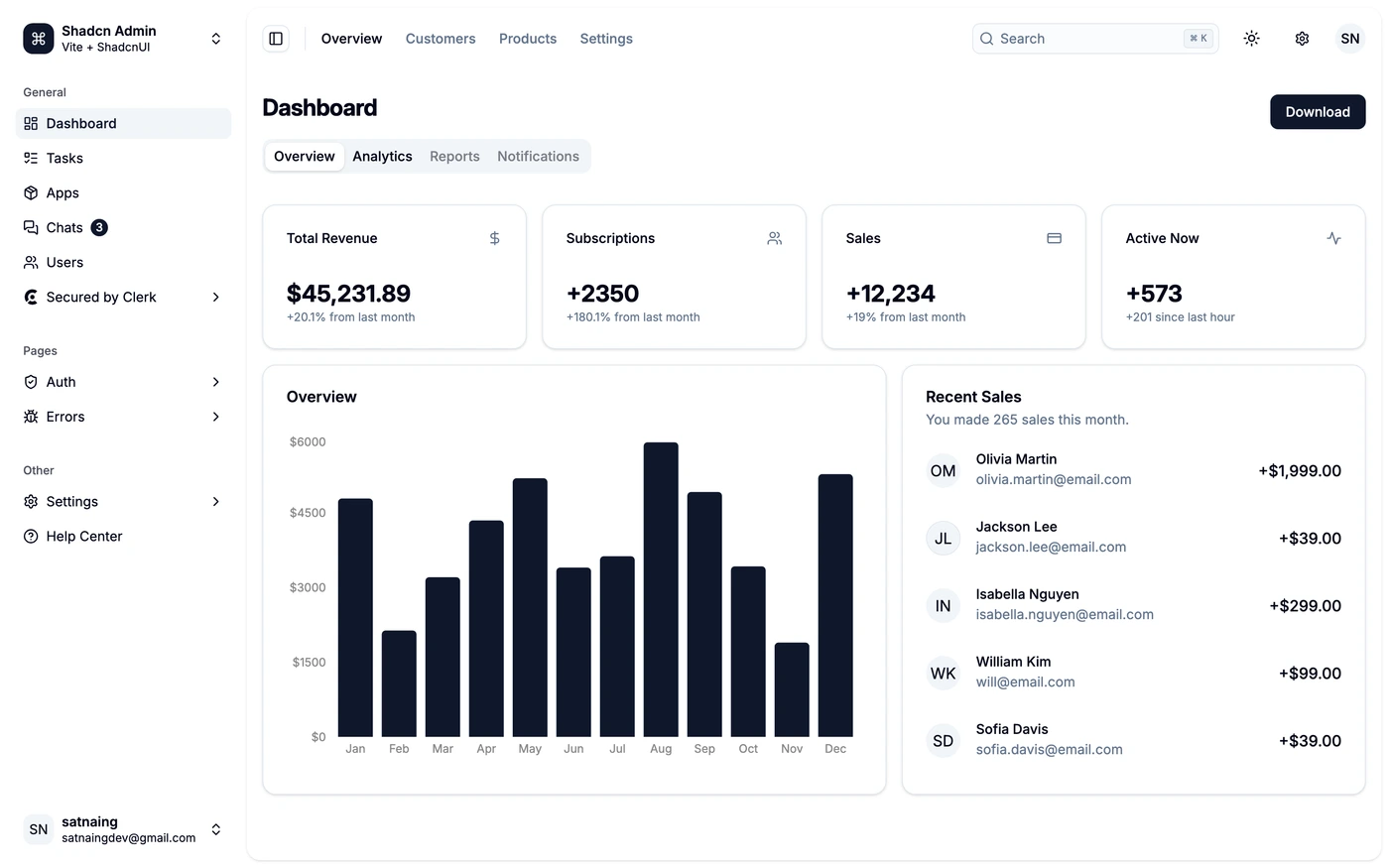
A component registry supplies implementation material. A reference helps explain the task and visual relationships. This workflow separates them; the tested output below is original code, not a 21st.dev component installation.

Shadcn Admin demo capture showing overview metrics, a monthly bar chart and recent sales
Shadcn Admin demo · captured . This is visual context, not installable source or evidence of keyboard behavior. Demo figures are illustrative.
  1. Choose the relationship, not the brand assets

    Read the reviewed dashboard notes. Here, an overview chart sits beside recent records. Decide which information your users need together, then use your own copy, imagery and data. Our Components bridge links to the official catalogue; check the selected item’s source, license and dependencies there.

  2. Specify the behavior before generating code

    The dashboard brief is an editorial starting point. For a search interface, request distinct loading, populated, no-match and failed-request states. Keep the input on failure, offer retry, ignore older responses, and announce updates without moving focus. Reuse your existing primitives rather than importing a whole visual system for one control.

  3. Inspect one actual output and repeat its checks

    Open the tested Claude Code search example. Its recorded input produced a React fixture; an external harness checked empty results, retry, stale responses, focus and narrow layouts. This does not establish success in v0 or another builder. Test your real API and authentication separately.

Check the integration before shipping

  • Review the selected component’s license and notices; a screenshot is not a source-code license.
  • Match the project’s React, Tailwind and motion dependencies; inspect the generated diff.
  • Try no matches, rejected requests and a slow response arriving after a newer request.
  • Use the keyboard, narrow layouts and reduced motion; verify contrast in your own theme.

For agent access, use the MCP connection guide and API documentation. Hosted MCP requires account sign-in and metered access; API/MCP build tools require Pro. This comparison does not connect to competitor accounts, install their packages or spend generation credits.

In detail

The 5 alternatives, one by one

  1. 01

    shadcn/ui

    Best for: Free, accessible primitives you own and edit

    Price: Free and open source

    shadcn/ui distributes editable source for primitives, blocks and charts. Its installation docs list React-oriented frameworks, and its registry MCP documentation covers agent setup. Use it to assemble your own system; source ownership does not remove dependency maintenance or accessibility testing.

    Pros

    • Free, open-source project
    • Editable components and composable blocks
    • CLI and documented registry MCP

    Cons

    • You assemble and test the finished interface
    • Copied code and dependencies still need updates
    • React-oriented; no native Vue/Svelte guarantee
  2. 02

    Magic UI

    Best for: Free animated components for landing pages

    Price: Free components · Pro $199 one-time

    Magic UI's free React/Tailwind set focuses on animated marketing components. Its docs also provide an official MCP server. Pro lists a $199 one-time individual license with lifetime updates, 50+ sections and 9+ templates. Commercial use is advertised, but reselling the code is prohibited.

    Pros

    • Free, open-source component set
    • Documented MCP access
    • One-time Pro option

    Cons

    • Marketing-focused rather than complete product journeys
    • Review motion and performance in your own page
    • Paid templates have separate license restrictions
  3. 03

    Aceternity UI

    Best for: Eye-catching effects and premium landing-page blocks

    Price: Free components · All-Access $169/yr or $199 one-time (sale prices when checked)

    Aceternity UI offers free components plus paid React/Tailwind marketing blocks and templates. Its pricing page lists 200+ premium blocks, 12+ templates and AI-ready prompts. The observed sale is $169 for annual access or $199 for lifetime access; annual updates cover one year. We did not test paid downloads.

    Pros

    • Distinctive, high-impact visual effects
    • Lifetime option instead of a subscription
    • Prompts for AI builders on paid plans

    Cons

    • Review motion, contrast and loading cost
    • Sale prices can change; check license terms
    • Paid prompts are not tested output in this comparison
  4. 04

    v0

    Best for: Generating whole screens and apps from a prompt

    Price: Free offer varies · Plus $30/user/month · Business $100/user/month; Premium is closed to new users

    v0 is Vercel's hosted AI builder with previews, Design Mode, GitHub integration and deployment. Its docs distinguish the new-user $5 one-time offer from existing Free accounts' $5 monthly allowance. Plus is $30/user/month and Business $100/user/month; Premium is being sunsetted. Check your account's allowance before starting.

    Pros

    • Whole screens from a sentence
    • Deploys and syncs with GitHub
    • Free plan to try it

    Cons

    • Credits and message limits depend on the plan
    • Generated code still needs security and behavior review
    • We did not run a native v0 generation for this comparison
  5. 05

    UI DiscoveryOurs

    Best for: Deciding what the UI should look like — before you pick components

    Price: Free to browse · Design $20/mo or $200/yr · Pro $49/mo or $490/yr for one account with 50,000 API requests/day

    UI Discovery supplies real website and app references, extracted visual metadata and original build briefs. Website prompts and API/MCP build tools require Design or Pro. Our Components bridge links to the official 21st.dev catalogue, not a mirrored component package. The workflow below links to one recorded Claude Code fixture and its limits.

    Pros

    • Real captures for layout and hierarchy decisions
    • Original briefs with extracted palettes and fonts
    • Works alongside a component registry

    Cons

    • References are not editable third-party source
    • Hosted MCP is account-based and metered; build tools require Pro
    • No native-builder success guarantee or complete coverage of app journeys

Decide in a minute

Which should you pick?

If you need editable primitives and composable blocks
→ shadcn/ui
If you need free animated landing-page components
→ Magic UI
If you need marketing blocks with a lifetime purchase option
→ Aceternity UI
If you need whole screens generated from a prompt
→ v0
If you need a multi-author registry with code handoff
→ Stay on 21st.dev
If you need real product references to brief your AI tool
→ UI Discovery

Define the interface, then choose the code.

Inspect the visual context, name the required states, and review an original implementation against your project's constraints.

21st.dev alternatives — FAQ

What are the best 21st.dev alternatives?

For free editable React primitives, shadcn/ui is the closest alternative. Magic UI and Aceternity UI suit animated marketing components and effects, v0 generates whole screens from a prompt, and UIDiscovery provides visual references and original build briefs rather than a component registry. Keep 21st.dev when you want a multi-author registry with code handoff.

Is 21st.dev free, and what are good free alternatives?

21st.dev advertises free browsing and two component copies per day; unlimited copies and installs are paid, and AI generation has separate credits. For free alternatives, compare shadcn/ui for primitives and blocks, Magic UI for animated marketing components, and Aceternity UI's free set for effects. Choose by the task, framework and license rather than assuming their catalogues are interchangeable; check each item's price before buying.

Is UIDiscovery a component library?

No. UI Discovery is a visual reference and original-brief layer. The Components bridge links to 21st.dev; it does not redistribute its component source. Website prompts and API/MCP build tools require Design or Pro.

Which options support Cursor or Claude Code workflows?

21st.dev advertises prompt and code handoff. shadcn/ui documents registry MCP setup for these clients, and Magic UI documents an official MCP server. UI Discovery's hosted MCP requires sign-in and plan allowances. These are documented capabilities, not a paid-account integration benchmark.

Do these alternatives support Vue or Svelte?

The component sets here are React-oriented. shadcn/ui lists several frameworks that can host React; that does not establish native Vue or Svelte equivalents. Check a framework-specific implementation and its source before committing.

Has the prompt workflow been tested?

One original search-state prompt was run in Claude Code 2.1.292 using claude-sonnet-5-5 on October 7, 2026. An external harness tested its React output and responsive site integration. It was not a 21st.dev component installation or a native v0, Magic UI or Aceternity test.

Can I copy a reference or resell component code?

A screenshot reference is not permission to copy source, branding or assets. Check each item's license and preserve notices where required. Magic UI Pro advertises commercial project use but prohibits code resale; do not generalize one vendor's license to another.

More comparisons

Looking for a wider list? See the best design inspiration websites, or all comparisons.

Designing in Figma? Compare Figma alternatives for design, prototyping and handoff.

Building with shadcn/ui? Browse real shadcn/ui examples.

Sources & last checked

Public sources were reviewed on ; this is not a paid-account performance test. Prices can change and may be localized. Where a price or plan detail could not be confirmed, the comparison states the limitation instead of estimating it. UI Discovery figures are counted from our library when this page is built; its access limits are checked against the current application configuration. Product names identify their owners; this page is written by UI Discovery and is not affiliated with or endorsed by them.